
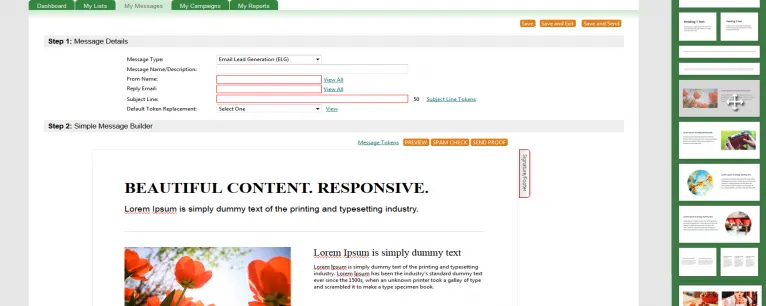
We’ve just launched our new drag and drop editor called ‘Simple Message Builder,’ which let’s you build and design email templates from scratch. It is part of our latest email lead generation software update – version 5.3.1.
Why did we launch it?
Simple.
Not everyone is blessed with coding skills.
And even if you’re a marketer who knows enough to be dangerous, when you’ve only got a few hours to schedule a campaign, who’s got the time to mess around with code.
Sometimes you just need the freedom to quickly build an email template, without bothering your in-house development team.
Now, busy marketers – like you – can quickly create fancy new emails from scratch. All you have to do is choose a blank template and drag and drop the pre-built design blocks from the menu bar right into the editor. You can then modify images and content on the fly.
It’s super quick.
It’s super easy.
And it’s intended for all skill levels.
Finally, there’s absolutely no need to muddle around with HTML code anymore (that is, unless you want to).
Now you can design email templates in seconds.
Here’s how it works:
First, navigate to the ‘My Messages’ section in your account. Click on the ‘New Simple Message’ button.

Step 1: Choose a layout
Select which email templates you’d like to use.

Step 2: Add Pre-Built Design Blocks to Your Email Templates
We’ve designed some beautiful blocks for you to choose from, which makes it really easy for you to build a template.
Toggle through some of our pre-built design blocks. When you find the one you like, highlight it and drag and drop it directly into the editor. That’s it.

Step 3: Edit Your Email
Once you’ve styled your template, you can modify the content or images of each section to quickly customize your email campaign.
You can change borders, font sizing or colors, etc., to creative beautiful-looking emails.

Step 4: Save
Our new editor will actually auto-save your work after 15-minutes.
However, it’s best to get into the habit of saving your work as you go. The save button is located in the top or bottom right.
P.S. For those who want to use HTML code as the basis to building their emails, don’t fret – you still have access to the ‘Advanced Message Builder.’